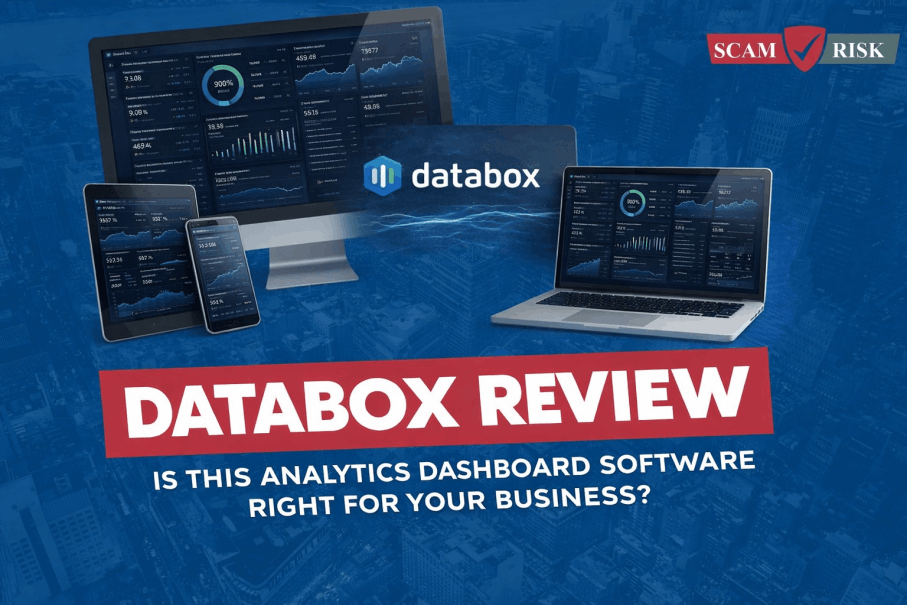
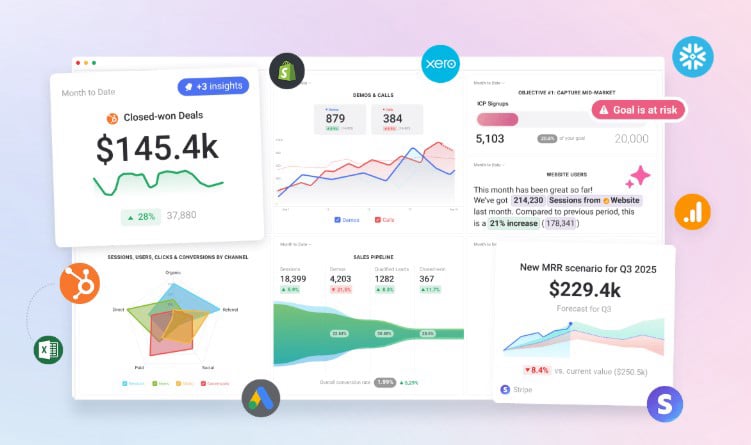
DataBox transforms scattered business metrics into a single, high-performance command center. Information flows directly from every connected tool into automated dashboards, removing the need for manual updates.
Performance is tracked in real-time against set goals, ensuring every trend and anomaly is visible instantly. This system replaces static spreadsheets with living reports that drive faster, smarter decisions across the entire organization. Complexity is traded for clarity, allowing the focus to remain on growth rather than data management.
DataBox is a business analytics and KPI dashboard platform that gathers all of a company's data into one centralized location. It is designed to replace manual reporting—like messy spreadsheets and switching between dozens of different apps—with automated, real-time visual reports.
How Does It Work?
The process follows four main steps:
Connect (Data Sources): The platform plugs into over 100+ popular tools (such as Google Analytics, HubSpot, Salesforce, and Shopify). It pulls the raw numbers automatically so nobody has to copy and paste them.
Visualize (Databoards): Once connected, the data is turned into "Databoards"—visual dashboards using charts, heatmaps, and progress bars. Users can use pre-made templates or a drag-and-drop designer to build their own.
Monitor (Goals & Alerts): It doesn't just show numbers; it tracks them against specific targets. If a metric (like sales or website traffic) drops too low or hits a milestone, the platform sends an automatic alert to Slack or email.
Report (Automation): Instead of building a new presentation every month, the platform sends "Snapshots" (automated PDF or JPG updates) to team members or clients on a set schedule.
Integration Process
One-Click Connections: Native support for 130+ tools like HubSpot, Salesforce, and Google Ads allows for setup in under five minutes.
Automated Syncing: Data pulls automatically on a set schedule, removing the need for manual CSV exports or spreadsheet updates.
Visual Mapping: Raw numbers from connected accounts transform instantly into pre-built charts, heatmaps, and funnels.
Data Blending: Metrics from different sources (e.g., ad spend from Facebook and revenue from a CRM) combine to calculate true ROI in real-time.
No-Code Interface: All connections and custom calculations are managed through a drag-and-drop designer, requiring zero technical or engineering skills.
Databox is primarily built for marketing agencies and B2B SaaS companies, but it serves any role that needs to consolidate data from multiple platforms into one visual "source of truth."
Here is a breakdown of why it fits each group:
1. Marketing Agencies (The "Power Users")
Databox is arguably most beneficial for agencies because it automates the "manual labor" of client reporting.
Best for: Agencies managing 10+ clients across different channels (SEO, PPC, Social).
Why: You can create one dashboard template and "clone" it for every client. It features Client Accounts that keep data separate and Scheduled Snapshots that automatically email reports to clients every week/month.
Key Benefit: Saves hours of manual data entry and allows agencies to show ROI instantly.
2. Marketing Managers & Teams
For in-house marketers, Databox acts as a "mission control" center.
Best for: Marketers who use a large stack of tools (HubSpot, Google Ads, GA4, Semrush, Facebook Ads).
Why: Instead of logging into five different platforms to see how a campaign is doing, you see all KPIs on one screen. It also allows for Calculated Metrics (e.g., combining spend from Facebook and Google to see total CAC).
Key Benefit: Real-time visibility into performance without needing to build complex spreadsheets.
3. Founders & CEOs
For founders, Databox is about high-level oversight and "peace of mind."
Best for: Early-to-mid-stage startup founders who want to track growth without getting "lost in the weeds."
Why: It offers TV Dashboards (to display on office walls) and Mobile Alerts. If revenue or traffic drops below a certain threshold, the founder gets a push notification immediately.
Key Benefit: Centralizes high-level KPIs (like MRR, Lead Velocity, and Burn Rate) so they can monitor the business health at a glance.
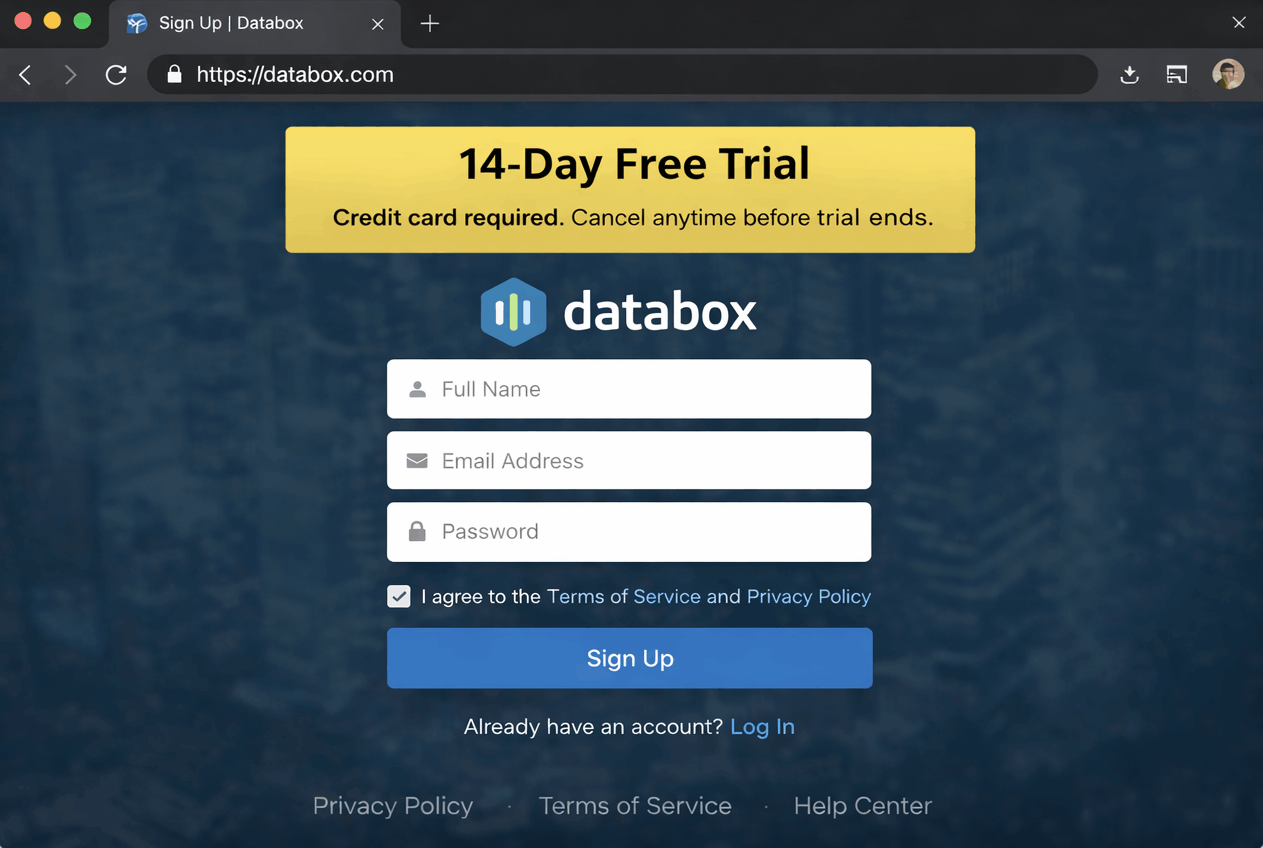
Databox offers a 14-day free trial that allows users to explore dashboards, integrations, and performance tracking features before committing to a paid plan.
You can cancel anytime during the trial directly from your account dashboard. Databox does not publicly advertise a money-back guarantee, so users are encouraged to start with the free trial or free plan before upgrading.
To help you build out the specialized sections of your website, here is a breakdown of the primary use cases for DataBox.com.
Each section is designed to show how the platform solves specific problems for different departments, written without using the word "we."
1. Marketing Use Case: The Full-Funnel View
Marketing teams use the platform to prove the value of every dollar spent.
Omni-Channel Tracking: Centralize data from Facebook Ads, Google Ads, and LinkedIn into one dashboard to compare Cost Per Lead (CPL) across all platforms.
SEO Performance: Monitor organic growth by pulling live rankings and backlink data alongside website traffic.
Content ROI: Track which specific blog posts or landing pages drive the most conversions by blending traffic data with CRM lead status.
2. Sales Use Case: Pipeline & Performance
Sales leaders use the platform to keep the team on track and predict future revenue.
Leaderboards: Create live rankings of sales reps based on calls made, meetings booked, or deals closed to drive healthy competition.
Pipeline Health: Visualize deal stages in real-time to identify "stuck" opportunities before the month ends.
Win/Loss Analysis: Automatically calculate conversion rates from "Discovery" to "Closed Won" to optimize the sales process.
3. Finance Use Case: Cash Flow & Growth
Finance departments move away from static spreadsheets to gain a living view of company health.
Profit & Loss (P&L): Connect tools like QuickBooks or Xero to see real-time income versus expenses without waiting for end-of-month closing.
SaaS Metrics: Track Monthly Recurring Revenue (MRR), Churn Rate, and Customer Lifetime Value (LTV) automatically.
Burn Rate Monitoring: Keep a constant eye on cash reserves and runway through automated alerts sent to management.
4. Operations Use Case: Efficiency & Ticketing
Operations teams use the platform to remove bottlenecks and ensure the business runs smoothly.
Support Speed: Monitor ticket volume and "Average Resolution Time" from tools like Zendesk or Intercom.
Project Management: Track task completion rates and overdue projects from Asana or Jira to ensure deadlines are met.
Cross-Department Alignment: Create "Executive Scorecards" that blend data from every department into one high-level health report for stakeholders.
Summary Point
DataBox.com serves as the central nervous system for a business, pulling scattered metrics from marketing, sales, finance, and operations into a single source of truth. By automating the flow of information, teams spend less time building reports and more time acting on the insights they reveal.
Advantages (Pros)
✅ Unified Data Command: Connect 130+ sources like HubSpot, Google Ads, and GA4 into one view, eliminating the need to toggle between different apps.
✅ Massive Template Library: Access over 200+ pre-built "Databoards," allowing for professional-grade reporting in minutes rather than hours.
✅ Goal Tracking & Alerts: Set specific targets for any metric and receive instant notifications via Slack or email if performance dips or milestones are met.
✅ Multi-Device Visibility: Dashboards are natively optimized for desktop, mobile, and even office TV displays for real-time team motivation.
✅ Data Blending: Use the "Query Builder" to combine metrics from different platforms (e.g., dividing Sales Revenue by Ad Spend) to calculate real-time ROI.
✅ Client Management: Specialized features for agencies allow for white-labeling and the ability to "clone" dashboard structures across multiple client accounts.
Limitations (Cons)
Historical Data Gaps: Depending on the plan level, there are limits on how far back historical data can be pulled (often capped at 11–24 months).
Visual Rigidity: The drag-and-drop designer is less flexible than tools like Tableau; chart types and layouts are restricted to a specific "grid" system.
Sync Frequency Limits: On lower-tier plans, data updates only once every 24 hours. Hourly or 15-minute syncs require higher-priced plans.
Learning Curve: While standard metrics are easy, creating complex "Calculated Metrics" or using SQL requires a deeper technical understanding.
No Refunds: The billing policy is strict, offering no refunds for partial months or unused time once a cycle has started.
Summary
DataBox.com excels at speed and automation. It is the ideal choice for teams that need a "Full Funnel" view at a glance without the high cost of a dedicated data scientist.
When comparing Databox, Google Analytics (GA4), and Looker Studio, the choice depends on whether the goal is to collect raw data, build deep custom reports, or monitor high-level business performance.
Google Analytics 4 (The Data Source)
Google Analytics is the engine that collects raw information from a website or app.
Role: It acts as the primary data collector, tracking every user interaction, session, and event.
Focus: Deep behavioral analysis. It excels at showing exactly how users navigate a site, where they drop off, and which pages are most popular.
Complexity: The interface is technical and often overwhelming for daily checks. It primarily shows website data, meaning it won’t display sales from a CRM or ad spend from Facebook without external tools.
Looker Studio (The Visualization Canvas)
Looker Studio is a free Google tool designed to turn data into readable, multi-page reports.
Role: A "blank canvas" for report building. It connects to Google services (like Ads and YouTube) for free and third-party tools via paid connectors.
Focus: Detailed storytelling and client presentations. It allows for "pixel-perfect" customization where every chart and color can be adjusted.
Complexity: It requires time to build reports from scratch. It lacks built-in features for tracking specific goals or sending proactive alerts when performance changes.
DataBox.com (The Performance Hub)
DataBox is a centralized command center that pulls data from GA4, Looker Studio, and 100+ other tools into one real-time view.
Role: A monitoring layer designed for speed and decision-making.
Focus: KPI tracking and automated reporting. It is built specifically to show if a business is "on track" to hit its monthly targets.
Advantages: Unlike Looker Studio, it features a native mobile app and a built-in notification system that sends alerts to Slack or email. It uses a rigid "grid" system to ensure dashboards always look professional and fit perfectly on office TVs or phone screens.
Why Databox Wins
✅ Built-In Goal Tracking: Unlike Looker Studio, which is a static canvas, Databox allows for the setting of specific targets for any metric. It visually tracks progress in real-time, showing exactly how close a team is to hitting monthly or quarterly quotas.
✅ Proactive Alert System: Databox wins because it "talks back." It sends instant notifications to Slack, email, or mobile if a KPI drops or a milestone is reached. Looker Studio requires manual login to see if something has gone wrong.
✅ Superior Mobile Experience: With a native app and Apple Watch integration, Databox ensures performance is visible anywhere. Looker Studio reports are notoriously difficult to navigate on mobile devices.
✅ Speed of Setup: With 200+ "one-click" templates, a professional command center can be launched in minutes. In Looker Studio, building a similar multi-source dashboard from scratch can take hours or days of technical configuration.
✅ Automated "Scorecards": Databox automatically delivers daily or weekly performance summaries to stakeholders. It eliminates the "reporting day" stress by ensuring everyone is updated without a single manual export.
Whether DataBox.com is "worth it" depends on your specific goals: automating your own internal work or managing multiple clients as an agency.
Here is the 2026 verdict for both groups:
For Small Businesses
Verdict: Worth it for efficiency, but watch the "source" limits.
✅ The Efficiency Gain: Small businesses often spend 5–10 hours a month manually updating "whiteboard" KPIs or spreadsheets. DataBox pays for itself by automating these updates.
✅ Focus on ROI: By blending ad spend (Meta/Google) with CRM data (HubSpot/Salesforce), you see your actual Customer Acquisition Cost (CAC) instantly, preventing wasted budget.
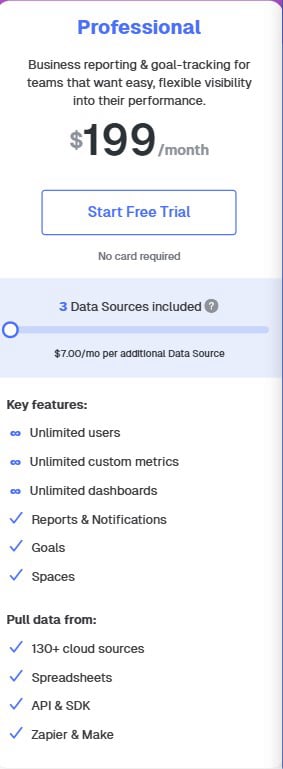
⚠️ The "Source" Trap: The Professional plan ($199/mo) only includes 3 data sources. If you need to track Google Analytics, Google Ads, Meta Ads, and a CRM, you are already over the limit and will have to pay for additional "add-on" seats.
For Marketing Agencies
Verdict: A "Reporting Lifesaver" that gets expensive at scale.
✅ Automated Client Reports: Agencies save hundreds of hours by "cloning" dashboard templates for new clients. Instead of "death by PowerPoint," you provide clients with a live link they can check anytime.
✅ Performance Alerts: You can set alerts to notify your team before a client notices a drop in performance, allowing for proactive campaign adjustments.
❌ The Cost Factor: While powerful, White-Labeling (removing the DataBox logo) is often a $250/month add-on.
❌ Data Limitations: Some agencies find the 11–24 month historical data limit restrictive for long-term clients compared to competitors like AgencyAnalytics, which is built specifically for agencies and often includes white-labeling in its base price.
In 2026, the data landscape has shifted toward proactive AI and automated accountability. Databox has kept pace by evolving from a simple dashboard tool into an AI-powered "Business Analyst" in its own right.
Here is the final verdict on whether you should invest in it this year.
The 2026 Verdict: Yes, for Growth-Focused Teams
Databox remains the strongest choice for teams that need to move fast. While competitors like Looker Studio are better for "looking back" at what happened last month, Databox is built to tell you what is happening right now and if you’re going to hit your goals by Friday.
Why It’s a "Yes" in 2026
✅ AI "Genie" Integration: New for 2026, the Genie AI analyst now provides automated summaries. Instead of you looking at a chart and wondering why traffic is down, the dashboard provides a written bulleted list explaining the cause (e.g., "Your Meta Ads CPC increased by 20%, leading to fewer clicks").
✅ Native "GoHighLevel" & "Reddit" Support: Databox has expanded its 130+ native integrations to include high-demand tools like GoHighLevel and Reddit Ads, making it easier for modern marketers to track everything in one place.
✅ Goal-Oriented Culture: It remains the only tool that makes "Goal Tracking" a primary feature rather than an afterthought. The color-coded progress bars (Green for on track, Red for at risk) provide instant psychological alignment for the whole team.
Why You Might Hesitate
❌ The "Per-Source" Cost: Pricing in 2026 remains a sticking point. The Professional plan ($199/mo) still limits you to 3 data sources. If you have a complex stack (SEO, PPC, CRM, Email, and Finance), add-on fees for extra sources can make the bill climb quickly.
❌ Rigid Design: If you need "pixel-perfect" reports that look like a custom-designed PDF for a board of directors, Databox’s "grid" system will still feel restrictive compared to Looker Studio or Canva.
Final Recommendation
Use Databox if: You want to stop building reports manually and want your data to alert you when something is wrong.
Skip Databox if: You have 10+ data sources on a tiny budget or need total creative control over how your charts look.
Databox is a business analytics and KPI dashboard tool that pulls data from multiple platforms into one visual, real-time dashboard for tracking performance.
Databox offers a free plan with limited dashboards and data sources, plus paid plans for advanced features, more integrations, and team access.
Yes. Databox provides a 14-day free trial on its paid plans, allowing users to test premium features before upgrading.
Databox integrates with popular tools like Google Analytics, Google Ads, Facebook Ads, HubSpot, Salesforce, Shopify, Stripe, and many other marketing, sales, and finance platforms.
Databox is best for marketers, founders, agencies, and data-driven teams. It may not be ideal for users who want deep custom BI modeling like Power BI or Tableau.
For teams that want simple, real-time dashboards without heavy setup, Databox is often considered worth the cost—especially compared to building custom reports manually.
Clicking the button below leads to a secure, encrypted setup page. No credit card is required to begin. After a few basic details are entered, instant access to the full DataBox ecosystem is granted. Within seconds, look for a confirmation email containing login credentials and a "Quick-Start" guide to begin connecting data sources and automating reporting immediately! 🚀
Data protection and client privacy are the highest priorities.
✅ Military-Grade Protection: All data-at-rest is secured with AES-256 encryption, while data-in-flight utilizes encrypted protocols (SSL/TLS) to safeguard every connection.
✅ Global Privacy Standards: The platform is fully SOC 2 Type II compliant and GDPR-certified, featuring multi-layer defense protocols and automated daily backups to ensure zero data loss.
✅ Encrypted Direct Links: Direct API integrations with 130+ partners (like Google, HubSpot, and Stripe) ensure information moves through secure, private channels without touching unsecure servers.
Experience the shift to automated clarity with total peace of mind. Every new account begins with a 14-day trial of the Growth Plan. If the platform isn't the perfect fit, the account can be downgraded or canceled at any time—no phone calls or hidden fees. It is a completely transparent, risk-free way to test the industry’s most powerful "DIY" business intelligence engine.
Consolidate the reporting stack and save 20% by switching to annual billing. Stop paying for manual analysts and multiple dashboard tools—lock in these exclusive 2026 rates today:
Choose Your 2026 Growth Plan:
Professional Plan | $159/mo (Billed Annually)
Best for: Small teams & individual marketers.
Includes: 3 Data Sources, unlimited dashboards, and hourly data syncing.
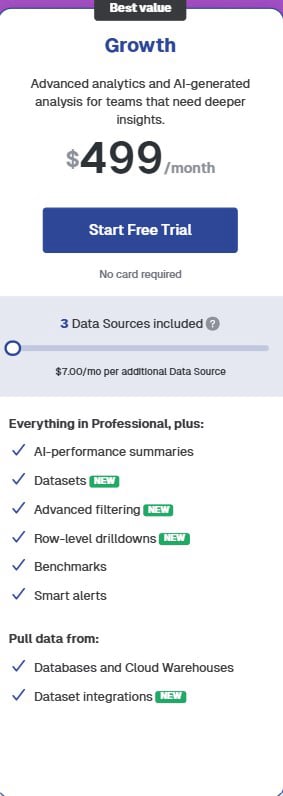
Growth Plan | $499/mo (Billed Annually)
Best for: Growing agencies & data-driven teams.
Includes: AI-generated performance summaries, data blending (Datasets), and row-level drill-downs.
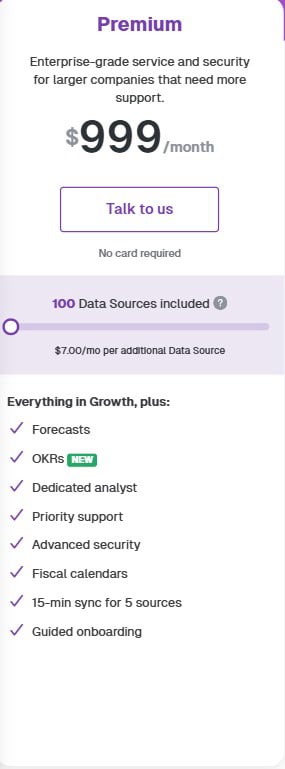
Premium Plan | $999/mo (Billed Annually)
Best for: Large agencies & enterprises.
Includes: 100 Data Sources, priority syncing, and advanced security management.
⏳ Don’t Wait! These discounted 2026 annual rates are available for a limited window. Claim a plan now to lock in savings, eliminate manual spreadsheets, and start building an automated growth engine before this promotion ends!
Today Only: Start 14-Day Trial
Disclaimer
Informational Purpose Only
The content provided on this website is for educational and informational purposes only. It is not intended as business, financial, analytics, or professional advice. Always evaluate tools and strategies based on your own business needs and consult qualified professionals where necessary.
Affiliate Disclosure
This website participates in the Databox affiliate program. This means we may earn a commission if you sign up or purchase Databox through links on this page—at no additional cost to you.
Our recommendations are based on research, experience, and perceived value, but the final decision to use any tool rests solely with you.
No Performance or Results Guarantees
We do not guarantee improvements in KPIs, dashboards, reporting accuracy, revenue, growth, or business outcomes. Any examples, use cases, screenshots, or metrics shown are illustrative only and should not be considered typical or guaranteed results. Outcomes depend on your data sources, integrations, implementation, and business execution.
Third-Party Platform Disclaimer
Databox is a third-party software platform that is independently owned and operated. We do not control Databox’s pricing, features, uptime, integrations, data accuracy, or future updates. All trademarks, logos, and brand names belong to their respective owners.
Data Accuracy & Responsibility
While Databox aggregates and visualizes data from multiple sources, you are responsible for verifying the accuracy of your data, configurations, and integrations. We are not responsible for reporting errors, data discrepancies, or business decisions made based on dashboards or analytics outputs.
“As-Is” Basis
All content, recommendations, tools, and resources on this site are provided on an “as-is” and “as-available” basis, without warranties of any kind, express or implied.
Compliance & Privacy Responsibility
You are solely responsible for ensuring compliance with applicable laws and regulations, including but not limited to GDPR, data protection laws, client confidentiality requirements, and internal compliance policies, when using analytics and reporting tools.
Limitation of Liability
We shall not be held liable for any direct, indirect, incidental, or consequential losses arising from the use of—or reliance on—any information, software, or services referenced on this website.